Enabling Android Auto in my Renault Zoe using an ESP32
Why Buy an OBDII Dongle When You Have an ESP32 and a Weekend?
Most people with a Renault Zoe and a copy of DDT4ALL do the sensible thing: they go on Amazon, spend $15 on a Konnwei or an OBDLink dongle, plug it in, and get to work.
Not today. Challenge accepted! I thought.
Buying a dongle would have been too easy. I had an M5Stack Atom Lite and a CAN Bus Unit, a weekend to spare, and a healthy disregard for the easy path. I knew next to nothing about ELM327 at the time — and honestly, still don't — but here I am, owning an Android Auto-enabled Zoe.
The "Because It's There" Challenge
The mission was to build a bridge between my laptop and the car's internal network. To do that, I had to make my ESP32 act exactly like an ELM327 — an aging but stubborn serial command protocol that hasn't changed much in twenty years.
To make it work, I dove into the source code of DDT4ALL and used Gemini and Claude to help me translate the Python logic into C++ for the ESP32, effectively using AI as a high-speed tutor to bridge my C++ knowledge gaps.
The Hardware Stack
- M5Stack Atom Lite — a postage-stamp-sized ESP32 development board.
- M5Stack CAN Bus Unit — built around an SN65HVD230 CAN transceiver, connecting to the Atom Lite via a GROVE connector.
Wiring it up
The GROVE connector carries four signals: GND, VCC, and two GPIO lines. On the Atom Lite, those data pins are GPIO 12 and GPIO 13, which I configured as CAN-H and CAN-L respectively. GND is on pin 4 (or 5, depending on connector orientation). The CAN Bus Unit's transceiver converts the ESP32's logic-level TX/RX into the differential voltage levels the car expects.
Those CAN-H and CAN-L lines connect to pins 12 and 13 of the car's OBD2 port — Renault's multimedia CAN bus.
A note on the Zoe's two CAN buses
The Zoe exposes two CAN buses at the OBD2 port, and picking the right one matters:
- Multimedia CAN bus — CAN-H on OBD2 pin 12, CAN-L on pin 13, running at 500 kbps. This is the bus the R-Link infotainment system lives on, and therefore the one DDT4ALL needs to reach in order to toggle the Android Auto setting.
- Powertrain / motor diagnostic bus — on the standard OBD2 pins 6 and 14. This is where most generic ELM327 dongles connect by default, which is why they won't see the infotainment ECU without modification.
Setting the ESP32's CAN peripheral to 500 kbps and wiring to OBD2 pins 12 and 13 puts you on the multimedia bus — exactly where the R-Link ECU lives.
The Moment of Truth
After hours of staring at Bad ELM response and WRONG RESPONSE: Unknown(), the screen finally turned. An ECU response appeared — a real one, from the car.
By precisely emulating the quirks of the ELM327 protocol, I was able to bypass the need for dedicated hardware entirely. I successfully accessed the Zoe's ECUs through DDT4ALL and toggled the setting in the infotainment module to enable Android Auto.
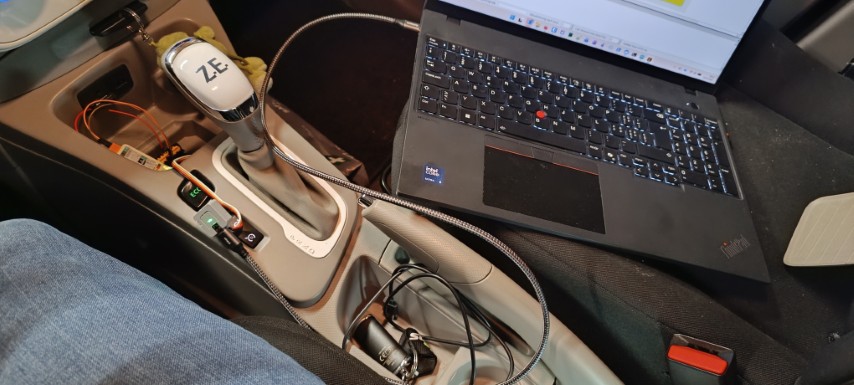
Was it worth it?
I spent a weekend doing something I could have solved with $15 and two clicks on Amazon. But I didn't just get a working diagnostic tool — I learned how automotive communication actually works under the hood: how CAN frames are structured, how the ELM327 protocol layers on top, and how a car's ECUs negotiate over a shared bus.
I'm still no expert in CAN bus or C++, but this project proved that with a bit of hardware and the right tools to bridge the knowledge gap, you can achieve quite something.
Just don't give up.
Source Code
The full firmware — an Arduino sketch ready to flash to an M5Stack Atom Lite — is available on Github or here:
// M5Stack Atom Lite – ELM327 Emulator for Renault Zoe R240
// Target: R-Link infotainment on CAN2 (500 kbps)
// Use with DDT4ALL on Windows @ 115200 baud
// State variables matching ELM327 defaults
bool echo_on = true;
bool headers_on = false;
uint32_t current_sh = 0x744;
uint32_t current_rx = 0x74C;
void
void